Posts

Showing posts with the label Application Integration

Gladinet Cloud Enterprise Local Editing

Image
The local editing feature is to use local application on Windows desktop and laptop to edit files sitting in the cloud directly without downloading and installing the full feature desktop client. The use case can be that you and your colleague are looking at some files together and you will need to make some modification and you are away from your desktop so you will need to make modifications without the full desktop client. Below is the video.
Gladinet iOS App Update

Image
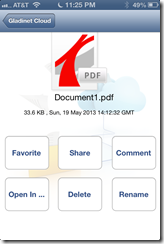
With the latest Gladinet iOS app update, The iOS app greatly increased the interaction between a cloud-bound file and applications native to the iOS device. 1. From iOS App, Open file In Other App From the iOS App, you can use the disclosure button to click into the file details view. In the view, there is an “Open In …” button. When click on this button, the file will be downloaded and sent to locally installed application. In the picture, applications that are capable of opening PDF files will be presented to the user to open this document.         2. From Other App, send file back to Gladinet Cloud From other iOS Applications, you can also do “Open In” if the application has an “Open In” option. For most of the file types, the Gladinet Cloud option is available. After clicked the “open in” option, the Gladinet Cloud application will be open, and a “Upload to Current Folder” button will show, allowing upload the document back into Gladinet Cloud . 3. W...