Posts

Showing posts with the label Amazon S3

Move File Server Storage to Cloud

Image
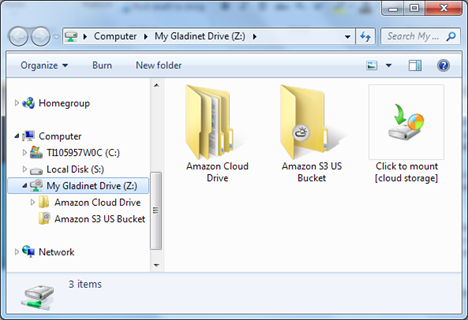
Here is a very common use case, as we received a lead from a potential customer: “We are a small company and we want to evaluate moving out file server storage to the cloud. We are evaluating Amazon S3 as a solution and already have some storage configured.  Currently we have 3-4 file servers each with around 2-3TB data. I would like to keep the changes to the users as small as possible (i.e. keep Windows Explorer as main interface).” As we summarize this requirement: Customer wants to move local file server to cloud (Amazon S3)   Customer wants to keep the same user interface (Windows Explorer)   The Gladinet Cloud Team Edition and the included Gladinet Cloud File Server Agent is built for this use case. Requirement #1 – Amazon S3 connectivity Gladinet Cloud Team Edition is open for Cloud Storage Account integration. You can bring your own storage to plug-it-into your own Gladinet account.
Use Amazon S3 as Your File Server

Image
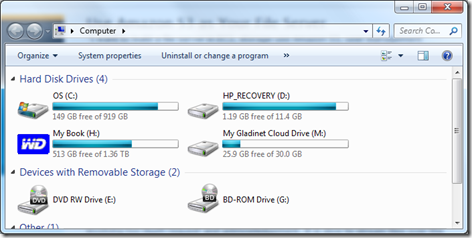
“I want to build a file server in EC2, storage use Amazon S3, user management integrated with Active Directory, and publish network shares with CIFS”. As Amazon VPC (Virtual Private Cloud) getting more and more popular and becoming the default for EC2 servers, we are seeing more and more requests like this for Amazon S3. As we will show you in this article, it is not hard to implement this with Gladinet Cloud solutions. There are two hurdles for you to overcome, which Gladinet Cloud does it for you. Problems to Solve (a) Amazon S3 is not  CIFS (Microsoft Network Share) protocol, so you will need an Amazon S3 to CIFS protocol converter. Otherwise, you can’t map a drive directly to Amazon S3. (b) CIFS protocol is a LAN protocol, suitable for local area network. Performance wise, it wasn’t designed for wide area network (AKA Internet). The CIFS protocol is too chatty, involving too much requests and acknowledgements. It is slow to stream files over the Internet from Amazon data c...

Mount a File Share with Amazon S3

Image
Many clients want to use Amazon S3 directly, and yet want to make it transparent to the users. As far as the administrator or the CTO is concerned, he wants to have direct control of the Amazon S3 account that his company is using. At the same time, he wants the employees in the company using the company Amazon S3 account transparently without any additional learning curve. This article documents many ways you can use Gladinet solutions to get it done. We will divide the use case into big, medium, small. Three use cases. Each use case may have a different matching solution. Big Use Case You have multi-site file structure and you have a need to setup team folder, version folder, web-based access, mobile device access,  in addition to mounting file share to your amazon s3 account. In this case, the best fit is Gladinet Cloud Team Edition, with your Amazon S3 account plugged in as the root folder of your company cloud drive. At www.gladinet.com , you can select Team Edition, then...

Amazon S3 Based, Full Control Online Storage Solution

Image
There are many, many Amazon S3 based online storage services. What is the difference, you may ask? What is Gladinet’s niche? What is the market segment to fill? The most popular online storage use case nowadays is the combination of web interface, desktop clients from PC and Mac, mobile clients, together with team folders support and peer-to-peer file sharing. Many online storage services do this.  The market niche is how to provide the functionality, while giving customers full control of the whole infrastructure stack from the bottom to the top.

Amazon S3 & S3 Compatibles

Image
In a recent Amazon S3 blog , it is reported that Amazon S3 has reached 905 billion objects. As usual, we will plot the new number together with its historical numbers and see the trend line. Worked out the math, it takes Amazon S3 247 days to double. So it doubles every 8 months . We have been following it for a while and it is almost like a broken record now. Congratulations to the growth of S3 and the validation of cloud storage market. This article will now discuss more about its Compatibles.

Amazon S3’s Exponential Growth

Image
In a recent Amazon Web Service Blog , It is quoted that Amazon S3 has reached over 762 Billion objects at the end of 2011. We have been following Amazon S3’s growth closely. As usual, we will plug the numbers in an Excel spread-sheet and see its growth in a chart. Double Every 8 Months  

Amazon S3 Based Share File Solution

Image
You own a small business and have several important folders on your desktop. You also have several people working for you that you need to share your desktop folders with. You may also be out of the office from time to time and your team are working from different places. So you are searching for a desktop folder sharing solution for your small business that allows people to work from different places.  You need a solution that is easier than email files back and forth.  Sounds interesting, read on … This is a very typical use case that keeps coming up when we talk to Gladinet customers. This  is easily solved by the Gladinet Cloud for Teams. Gladinet Cloud built on top of Amazon S3 . In addition, you can plug-in your existing Amazon S3 account.  Several articles in the past month discussed the first default option. This article will discuss the second option. So you have heard of Amazon S3 and are already using it but you need a more completed end-to-end solutio...

Gladinet Cloud Solutions for Amazon S3

Image
Last week, Amazon Web Services Blog reported that there were 566 Billion Objects in Amazon S3. We have been following Amazon S3’s growth closely and here is a picture we plotted with Excel. You can see the growth fits well with the red exponential curve.

Amazon S3 User Identity Explained

Image
Amazon S3 was designed with developers as its audience. Developers create applications around the Amazon S3 and those applications are used by the end user. Seeing the amazing growth from Amazon S3, we are also seeing more and more people from real estates, dental office and many other small and medium sized businesses started to use Amazon S3 directly since the aws.amazon.com web-front provides many basic functionalities. Gladinet supports Amazon S3 from day one with functionalities like map a network drive to Amazon S3; backup to Amazon S3; leverage Amazon S3 as a PC-2-PC sync bridge and conduit. As long as you have your master Amazon S3 account credentials, you can use Gladinet software with Amazon S3. Now, Amazon introduced IAM (identity and account management) in its aws.amazon.com web interface. This introduced new user identities in one single master account. So now, not only it is possible to have a set of master account credentials, normal S3 admins can also create sub-use...

Setup File Server With Amazon S3

Image
You have a file server for your team to share. You have heard of cloud storage and the leading service such as Amazon S3. Now you are considering how to extend your file server with cloud storage services. Objectives There are several objectives to combine a file server with cloud storage service. First, you want your team to continue to have the same user experience with the file server since they are already familiar with the file server. Second, you will like to extend the file server’s capacity with cloud storage so you don’t need to buy internal hard drives. Third, possibly backing up some existing folders on the file server so in case anything happen to the file server, you can quickly replace it and restore the files and folders.

Amazon S3 as a Team Network Drive

Image
Amazon S3 is getting more and more popular with Small and Medium sized Businesses(SMBs). These SMBs typically have mobile workers and office workers. They are looking for a cloud drive solution for a team of users. The earlier solutions from Gladinet requires the Amazon S3 master account holder to share the account credentials with the team so each team member can mount the same Amazon S3 account and buckets, thus they can all use the same cloud drive. With the latest version from Gladinet , it is now possible to integrate and leverage the Amazon Identity and Account Management (IAM) feature so each team member can have a set of unique credentials and get assigned a special bucket to use, while the account master keeps the mater account secrets to himself.

How to Mirror Local Directory to Amazon S3

Image
You may have several important directories that you want to protect online. It would be nice if you can mirror these folders into a online storage service such as Amazon S3 . This tutorial shows the steps to set it up so your folders get protected by Amazon S3. You can use either Gladinet Cloud Desktop or Gladinet Cloud Backup . For the Gladinet Cloud Backup, not only you can protect your local directories, but also you can protect them with version control (snapshot) and the ability to roll back in time. This tutorial will focus on Gladinet Cloud Desktop for the mirror backup feature. When you are ready to try the snapshot backup, you can use the integrated Cloud Backup add-on in Gladinet Cloud Desktop (or use the stand-alone Cloud Backup package).

Amazon S3 as a Network Drive

Image
Amazon S3 is the leading and most mature cloud storage service in the market now. We have seen more and more customers started to use Amazon S3 for their storage need.  For these customers, the ability to map Amazon S3 as a Network Drive is critical. Drive mapping allows them to double click on a file and editing it in place. From a usability perspective, there is no more user interface to learn because hard drive, or USB drive and now a cloud based drive is a very familiar concept in Windows user interface. This article will document the steps it takes to map Amazon S3 as a network drive with the latest Gladinet Cloud Desktop .

PC-2-PC File Sync Over Amazon S3

Image
After you have an Amazon S3 account, you can connect and access it at work. You can also connect and access it when you are on the road. It can now be used as a bridge to synchronize your files and folders between your office PC and your mobile laptop PC. This article discuss steps to setup PC-2-PC file synchronization among your PCs. First you need to activate your Amazon S3 account. If you are already an Amazon user, this step is fairly easy. You just need to visit http://aws.amazon.com and sign up for Amazon Web Services. After that, you can install Gladinet Cloud Desktop on your PCs. Step 1 – Planning In this step, you will see whether you want to have a brand new folder so you can drop files into it for sync purpose. Or if you already have multiple folders sitting locally that you want to sync. Based on what you want to do, you can create your Amazon S3 buckets first. For example, if you already have 3 separate local folders that you want to sync separately, you can crea...

Password Protect Amazon S3 Folders

Image
When using Amazon S3 together with Gladinet Cloud Desktop , you can have a virtual drive and virtual folder mapped directly to your Amazon S3 account and bucket. It is very convenient for you to transfer files back and forth between your local PC and the remote online storage. This article talks about a security feature that help you protect some folders inside the Amazon S3 with encryption. First you will need to mount an Amazon S3 bucket into Gladinet. it will show up as a virtual folder inside Gladinet drive.

Amazon S3 Compatible Cloud Storage

Image
If you are the leader, you have supporters. If you have many supporters, your API becomes the standard many would like to use. Now Amazon S3 is the leader when it comes to cloud storage so its Amazon S3 API is widely used. There are many cloud storage players that have Amazon S3 compatible APIs. For example, Google Storage for Developers;  Eucalyptus/Walrus; Scality/Dunkel; Mezeo Compatibility API and etc.. Gladinet supports Amazon S3 compatible cloud storage with its suite of cloud storage access solutions, including Cloud Desktop , CloudAFS and Cloud Backup .

Backup Cloud Storage to Local PC

Image
Backup cloud storage to local? YES! It may sounds like anti-trend but our customers started to ask for ways to backup cloud storage to low cost local server. The customers asking for this, are customers that adopted cloud storage and moved IT infrastructures to cloud storage. From a business continuity perspective,  they wish cloud storage availability with low cost local drive. These customers are steps ahead of others at current stage, when most of the users are still thinking about local to cloud backup. With Gladinet Cloud Desktop , backup cloud to local is as easy as a drag and drop. This article will use Amazon S3 as an example to backup to a local folder.

Amazon S3 and Amazon Cloud Drive Working Together

Image
Amazon S3 has been on the market since 2006. It is an excellent cloud storage service, mostly for developers and independent software vendors (ISV) to integrate into their products and resell to end users. It was less known as a consumer product but getting more popular as an online storage solution, together with the ISV’s products. Amazon Cloud Drive is brand new, about 3 weeks old, a new entry into the market as a consumer product. It is an online storage and also an online music streaming service. It is also built on top of Amazon S3 itself. If you are an Amazon S3 customer and are also interested in the Amazon Cloud Drive, you may wish to see them work side by side so you can move folders and files back and forth. This article demonstrates both online storage services working side by side in Windows Explorer. You will need to get a copy of Gladinet Cloud Desktop first. After download and installation of the Cloud Desktop, the steps are pretty straight forward.

How to Sync Folder over Amazon S3

Image
Amazon S3 is getting more and more popular. 2 years ago it was only known to the developers community. However, because of its leadership position in the cloud storage category, it got viral and now many small business owners are knowing it and thinking about leveraging it for more productivity. One of the common use case is:    If I already have an Amazon S3 account, how do I set it up so I can sync a folder from PC1 to PC2 when the PCs can be on different places. Gladinet Cloud Desktop 3.0 comes with a file sync feature that allows you to sync over your existing cloud storage. This article shows how to set it up. Step 1 – Setup Amazon S3 First you will need to visit http://aws.amazon.com , set up your AWS (Amazon Web Service) account.

Amazon S3’s Amazing Growth

Image
In a recent Amazon Web Services Blog titled '”Amazon s3 – Bigger and Busier Than Ever”, it documented Amazon S3’s amazing growth from 0 in 2006 to over 262 billion objects now. As we plot the same numbers on an Excel graph and apply an exponential trend line, it shows Amazon S3 grows almost exponentially. This graph is a living proof of the fast growing cloud storage market and Amazon S3 is leading the charge. If you are a small and medium sized business, you can leverage Amazon S3 to be more productive. Earlier, we published a case study from a real estate company, about how they leverage Amazon S3 to provide both on-premise and off-premise access to Amazon S3. Once the data is moved from a on-premise file server into the cloud, it greatly enhanced user’s productivity since they can access it easily and share easily.