Posts

Showing posts with the label Access

Easily Access Your IBM SmartCloud Object Storage
Image
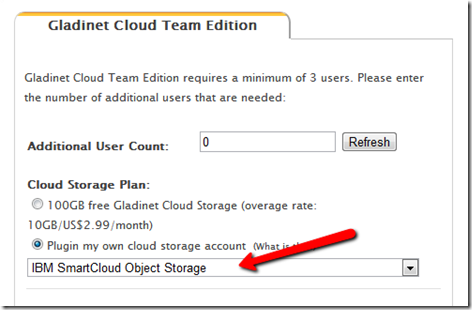
IBM SmartCloud Object Storage is targeted for Enterprise Cloud Storage. Most of the time, it is used for disaster and recovery or as an alternative media storage option. This series of articles discuss other common use cases – team collaboration and file server replacement. The use case will allow you to roam around freely and yet always have access to your files and folders in the IBM SmartCloud, whether the access is direct web browser access; desktop client access; file server access or mobile device access. First you will need an IBM SmartCloud Object Storage account and a Gladinet Team Edition account. Got www.gladinet.com , select Team Edition. In the next page, select “Plugin my own cloud storage account” first, then select “IBM SmartCloud Object Storage”. In the next page, you will enter your IBM SmartCloud Object Storage account information.  

A BASIC Layer on Top of OpenStack Swift

Image
The BASIC layer, on one hand, refers to the basic end user needs when it comes to cloud storage. The BASIC layer, on the other hand, refers to the sum of B ackup, A ccess, S ync/ S hare, I dentity and C ontrolled C ollaboration. End user won’t use OpenStack Swift storage directly because the interface is too primitive (such as read/write/delete objects). With a BASIC layer stacked on top of the OpenStack Swift, the basic needs are met and now it is ready for end user to use. It means the BASIC layer helps to sell OpenStack Swift Object Storage. So What is in a BASIC Layer?

Cloud Storage Middleware

Image
As quoted from Wiki, Middleware is computer software that provides services to software applications beyond those available from the operating system. We have seen the evolution of cloud computing and cloud storage. In terms of cloud storage service, Amazon S3 pretty much defines what cloud storage is. All the cloud storage services now are very similar to Amazon S3, whether it is Windows Azure Blob, EMC Atmos , Google Cloud Storage or OpenStack Swift Object Storage. These services have several things in common. First they are file (object) based. Second, they provide a set of very primitive API over HTTP, such as read file, write file, delete file and that is pretty much it. In a strict sense, cloud storage services referred to these services that provide the most primitive read/write functionality and  solved the most important problem of redundancy and scalability. It is the platform layer.

Access and Backup to HP Cloud Storage

Image
Today HP moved its cloud services to public beta. Gladinet has been working closely with HP Cloud Service since private beta to provide product integration support. Gladinet is also announcing today the support of HP Cloud Storage service with the full Gladinet Suite of products. In the latest Gladinet Desktop Client, you will see the HP Cloud drop down, which allows you to attach your HP Cloud Storage account into Windows Explorer as a mapped network drive. At the next screen, you can enter the related HP Cloud account information.

Gladinet 2011 Review

Image
It is 2 days to Christmas 2011. Wish every Gladinet user happy Christmas and a happy new year 2012. As usual, it is time to take a look back at the year 2011, review the Gladinet milestones and look forward to year 2012. The most significant milestone in 2011 was the mark of over 1 million Gladinet software downloads, with important milestones reached in other aspects of the business too. Product Development In February, Gladinet Cloud Desktop 3.0 was released, followed by Gladinet Cloud Backup 3.0 in March and Gladinet Cloud AFS 3.0 (Cloud Server) in June. This is a complete suite of access products that help users access cloud storage from desktops and file servers. Gladinet continues to strengthen the core competency of  on-ramp solutions to cloud storage, bridging the gap between local storage and cloud storage. If you have Microsoft Cloud Storage, Google Cloud Storage , Amazon S3 , Rackspace Cloud Files and so on, Gladinet is the most downloaded solution to help accessing ...

Why People Use Cloud Storage

Image
We have been running a ‘ Why You Use Cloud Storage ’ survey on Gladinet blog for several months. From the survey, we can get a glimpse into the solutions people are looking for when they use cloud storage. In the survey, there are 5 categories to choose from – Backup, Access, Sync, Integrate, Connect and Share. These 5 categories also represent what Gladinet Cloud software covers with its product suite – Gladinet Cloud Desktop, Gladinet Cloud Backup, Gladinet Cloud Server and Gladinet Cloud for Teams.

Amazon S3 Based Share File Solution

Image
You own a small business and have several important folders on your desktop. You also have several people working for you that you need to share your desktop folders with. You may also be out of the office from time to time and your team are working from different places. So you are searching for a desktop folder sharing solution for your small business that allows people to work from different places.  You need a solution that is easier than email files back and forth.  Sounds interesting, read on … This is a very typical use case that keeps coming up when we talk to Gladinet customers. This  is easily solved by the Gladinet Cloud for Teams. Gladinet Cloud built on top of Amazon S3 . In addition, you can plug-in your existing Amazon S3 account.  Several articles in the past month discussed the first default option. This article will discuss the second option. So you have heard of Amazon S3 and are already using it but you need a more completed end-to-end solutio...

Google Cloud Storage for Backup and Access

Image
Google has been providing cloud storage under the name of Google Storage for Developers for over two years. Recently it was renamed to Google Cloud Storage and graduated from the Google Code Lab. There are many ways you can use the Google Cloud Storage. For example, you can use it to backup your files; use it as an external drive so you can drag and drop files to it. This article will go over these two use cases with Google Cloud Storage. We will use Gladinet Cloud Desktop for the demo purpose. The same use cases are covered by Gladinet Cloud Server and Gladinet Cloud for Teams too. Step 1 – Activate Google Cloud Storage If you have never used Google Cloud Storage before, the first step is to activate it for your Google Apps account or your GMail account. goto http://code.google.com/apis/storage/ , and click on the Activate Google Cloud Storage button.

Anywhere Access with a Cloud Drive

Image
This is the second part of a 3-part video demo series about the Gladinet Cloud use cases. In this article, we discuss having a cloud drive, where you can have native drive letter access on the desktop or have web browser access through the web. Compares to the ‘Share Files with Gladinet Cloud’ in the first series, cloud drive focuses on the flexibility of how to quickly upload random files to the cloud drive and make it available to yourself or your team, while the ‘Share File’ series focus on how to quickly systematically share big folders from your desktop to the web. This following video describes the ‘Cloud Drive’ feature and how you can have a drive, both on your PC’s desktop and on the web. The video is in YouTube 1280x720 HD format so it is best to view with the 720p option and with full screen.

Attach Local Folder to the Cloud

Image
Today we had an online meeting session with a law firm. The use case is very common and typical. The owner has a desktop PC that has several folders on the desktop that he wants to move to the cloud. He has several goals in mind. Goal A : Share those folders with team members directly from desktop or from cloud. Goal B : Easier access to those folders, such as web access, anytime access and drive letter/local drive kind of access. Goal C : off-site backup of those folders.   Goal D : Team members have easy access to those folders, preferably with web access. This is a very common use case for a team environment, when everyone is roaming around, not necessarily in the same office. The team doesn’t want to maintain file server in the office, nor do they want any VPN kind of remote access solution. Welcome to the cloud computing era, when these goals are so naturally achieved by the cloud. With Gladinet Cloud for Teams, it is a feature called ‘ Attach Local Folder to the C...

Backup, Access, Sync and Share with Gladinet Cloud

Image
We talked about cloud storage use case can be summarized as BASIC (Backup, Access, Sync & Share, Identity & Control). This article discuss how the BASIC cloud storage use case is served by Gladinet Cloud. First there is a quick introduction video that may present it better than the writing here. Quick Intro Video (The video is 1280x720 HD)