Posts

Showing posts with the label cloud gateway

Bridging On-Premise and Cloud Storage

Image
Yesterday, Gladinet Cloud Storage Access Suite ( Gladinet Cloud Desktop , Gladinet Cloud Backup , Gladinet CloudAFS ) registered over a Million downloads. It is an important milestone, validating the market of bridging On-Premise storage and cloud storage. There are several observations we have made from the growing Gladinet user base. 1. Cloud Storage needs Local Access Point Cloud storage is in the Internet. However, people need easy and practical access from local IT infrastructure. In general, people call this the gateway or the on-ramp to cloud storage. The cloud gateway can be generalized  to include desktop client, special backup agent or a central access point like a file server replacement. In Gladinet’s product suites, the desktop client is Gladinet Cloud Desktop; the special backup agent is Gladinet Cloud Backup; the file server replacement is Gladinet CloudAFS. The three products have similar look-and-feel as they fit into a single platform for cloud storage access...
Use Rackspace Cloud Files as a File Server

Image
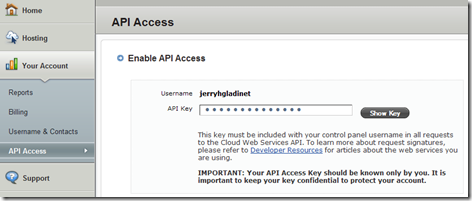
Rackspace Cloud Files is a good cloud storage choice. Rackspace will host your data inside its data centers and allow you to use the online storage over the Internet – thus cloud storage for you. File server replacement is one of the main cloud storage use case. Basically you can attach cloud storage as a tier 2 storage to an on-premise file server and extends the file server’s capability. If the file server goes down for whatever reason, you can quickly provision a new file server and attach the same cloud storage to it as part of the business continuity strategy. This article will cover steps to turn Rackspace Cloud Files storage into a tier 2 storage for an on-premise file server. Step 1 – Rackspace Cloud Files Account First you will need to establish a Rackspace Cloud Files account. After login into the cloud control panel, you can go to your Account area and click on the API Access, which will lead to your username and API Key.

Cloud Storage for Your File Server

As I was explaining Gladinet CloudAFS to a group of IT people as a file server with cloud storage attached, one question I got was:     How much bandwidth you need to run file server with cloud storage? It is very obvious where the concern is coming from. If I had an on-premise file server, with cloud storage attached as tier 2 storage, will the slowness of the Internet (as compared to LAN) slow down the file server activities? Rest assured, Gladinet CloudAFS takes care of this. Specifically, it takes care of two issues. A. Slow Internet to the Cloud Storage – that is why it is tier2 storage. B. There is a glitch, Internet is down. The secret to both maintain local LAN performance and leverage Cloud Storage is to have a tier 1 storage locally on the hard drive (or NAS or SAN). When people read and write to the file server, it is writing to and reading from the tier 1 storage, thus gives you an impression of local storage because it is indeed local storage. Gladi...

Cloud Gateway to Amazon S3

You are the IT admin of a 50-student team and you are thinking of providing cloud storage for each of the 50 students. Each will have around 10G cloud storage space. Each will have both home access and on-premise access to the storage. This is a typical use case for students in your department looking for places to store their project files and term papers. Why Cloud Storage? As the admin, you are looking for a low cost solution without the burden of maintenance. For 10G, the cost is around $1.5 per month per person for storage and some more for bandwidth. The cost is pretty low compares to someone has to maintain an in-house file server. Why Amazon S3 When it comes to cloud storage,  Amazon S3 is the leader in this category in 2010. It has been in the market for the longest and has the biggest deployment. Gateway to S3 Cloud gateway can mean different things to different people.

Cloud Storage Strategy How-Tos

As the CIO, you have been thinking about Cloud Storage for sometime. How to best leverage the capability and cut cost? How to plan for the long term with integration and migration? There are many questions to answer. This article will discuss several repeating patterns from our customers . (1) What problem the cloud storage solves for you? 1.a Offsite Backup and Disaster Recovery Cloud storage is excellent for backup since it is offsite storage by nature. 1.b Integration with Content Delivery Network You have documents and media files that you need to push to the edge of the world for your customer. Cloud Storage is very good with the integration with CDN services. 1.c Sharing Documents with Customers. You don’t like to pass documents back and forth in email attachments with customers. You need a central repository that you can share. 1.d Sharing Documents between Your Remote Sites. Overtime, you remote sites accumulated storage silos that you can’t share with other...

Why Cloud Storage Gateway is not Enough

If Cloud Storage is new to you, Cloud Storage Gateway is newer. Cloud storage could be a natural fit for disaster recovery and offsite backup. Cloud Storage Gateway or just Cloud Gateway can be the simple solution you are looking for to leverage different cloud storage services. As defined in wiki: A cloud storage gateway is a network appliance or server which resides at the customer premises and translates cloud storage APIs such as SOAP or REST to block-based storage protocols such as iSCSI or Fibre Channel or file-based interfaces such as NFS or CIFS. – wikipedia.org Old Tricks in a New Hat Since the primary job of a cloud gateway is translation of the newer REST protocol to the older file system protocol, it gives you a quick path to cloud storage without rewriting your on-premise applications. For example, you can use Gladinet CloudAFS (AKA Gladinet Cloud Gateway ) to quickly enable your existing file server with tier2 storage from many major cloud storage service ...

EMC Atmos in a Nutshell

Image
About a quarter ago, EMC announced that it will  no longer be supporting “production usage” of its Atmos Online cloud storage service. Instead, EMC encourage existing customers to move to its cloud storage service partners, such as AT&T Synaptic Storage, Peer 1 CloudOne and etc. That generated quite some publicity about the comes and goes of cloud storage services. What is Atmos? For curiosity , what exactly is EMC Atmos Online? To answer this, we must first introduce EMC Atmos.   EMC Atmos is a cloud storage product including both hardware and software. It is designed with scalability in mind for public cloud and big enterprise. It is an object storage with a UUID assigned to each object, while maintaining a HTTP REST interface to the underlying object storage. EMC Atmos Online was a cloud storage service built on top of Atmos. It first started as a developer/partner site for partners to develop solutions around the service offering. Later it went through a ...

What is New in Gladinet CloudAFS 2

Image
Today we announced the ‘Home Directory’ support for Gladinet CloudAFS 2 , which works with major cloud storage services such as Amazon S3 , AT&T Synaptic Storage , EMC Atmos , Google Storage , Mezeo , Nirvanix , Peer1 and Windows Azure . The Gladinet development team is also working on the Rackspace CloudFiles , OpenStack ,  Caringo CAStor and other integration support. Pretty soon, these cloud storage services will be integrated to Gladinet Cloud Suite. What is a Home Directory? Before we talk about home directory, let’s talk about a shared directory first. It is fairly easy to understand a shared cloud storage directory. Everyone has a mapped drive to the CloudAFS server, the server in turn connects to cloud storage services and give you the same cloud storage to share. This was a default behavior in the first version of CloudAFS, a simple gateway to the cloud. Now CloudAFS 2 introduces home directory for each user. Driven by feedbacks from our partners, it is als...

Attach Amazon S3 Buckets to Windows Server

Image
What are Amazon S3 buckets? They are containers full of storage objects. How can you access them? There is AWS (Amazon Web Service) Management Console Web Interface in a web browser. There are also many other Amazon S3 clients you can use to upload files into the buckets. Wouldn’t it be cool when you upload files by the AWS web console and the files show up on your Windows File Server; and vise versa? As an admin, you can remotely administer your Amazon S3 buckets over the AWS web interface, keeping the Amazon credentials to yourself. For the group of users that you are serving, they can share the Amazon S3 buckets by mapping a drive to the Windows file server, using their own Active Directory credentials.

How to Pick a Cloud Storage Gateway?

As defined in Wiki, A cloud storage gateway is a network appliance or server which resides at the customer premises and translates cloud storage APIs such as SOAP or REST to block-based storage protocols such as iSCSI or Fibre Channel or file-based interfaces such as NFS or CIFS. – wikipedia.org Cloud Storage Gateway or just Cloud Gateway is a new product category. The main benefit is that it can bring cloud storage on-premise to where you work. When it comes to pick a cloud storage gateway, there are several questions to ask before you buy one.

On-Premise Gateway to Amazon S3

Image
Amazon S3 is the leading brand in cloud storage. With over 130 Billion objects stored, it is also battle tested to scale. It grows and gains trust from businesses around the world looking for offsite storage. If you are one such business, all that you need is an on-premise gateway to Amazon S3.

Cloud Gateway to Google Storage

Image
In the eyes of cloud storage service providers such as Google Storage, any On-Ramps tools, desktop clients, edge devices or appliance that can talk to Google Storage is a gateway. In the eyes of end users or IT admin, A cloud gateway refers to a central access point that does the translation of LAN based file protocol such as CIFS (Microsoft net share) to the cloud storage REST protocol.  As a non Google storage user, Google storage may refer to the Gmail storage, Google Docs storage . As a Google Storage user, the Google Storage may refers to the Google Storage for Developer (which announced at Google I/O this year). It doesn’t matter which definition you take, Gladinet got it all covered. The 3 products Gladinet Cloud Desktop , Gladinet CloudAFS and Gladinet Cloud Backup can build the bridge between local access and the remote storage from Google.

ABCD of Cloud Storage Solutions

Image
If C in the middle of ABCD is the Cloud Storage, it is surrounded by A, B and Ds to form a cloud storage solution suite. A is Access and Attach .  You need a solution to reach out to access cloud storage from local PC. You need a solution to attach and bring in cloud storage to your file server. You need AFS as in the Gladinet Cloud AFS to get the job done. It is a gateway solving the access and attach problem.

Cloud Gateway – Extend your On-Premise Storage with the Cloud

Image
What is the easiest way to access Amazon S3 , Windows Azure Storage , EMC Atmos , Google Storage , or just the cloud storage as the inclusive term? As a home user, perhaps the easiest is a desktop client tool. Install the desktop client tool, putting in Amazon S3 access key and secret key, you can access Amazon S3 from Windows Explorer directly. For example, Gladinet Cloud Desktop is one such desktop application, connecting directly to the cloud storage. However, for an SMB with a small IT staff, the desktop client may not be the easiest, since it still require some installation and configuration work. The easiest could be a cloud storage solution that allows the end user access the cloud transparently, meaning they don’t even need to know that they are using cloud storage. This is when a Cloud Gateway comes in.

A Cloud Backup Component without “Backup”

There are already quite some online backup solutions out there. Many of them are end-to-end solutions, including the front end UI on user’s desktop all the way to the backend storage. Solutions like Mozy or Carbonite has its own backend storage. Other solutions may resell Amazon S3 storage. There is also a segment of the market that doesn’t need end-to-end cloud backup solutions. For example, Backup Exec users that already have invested in a backup solution, why should they invest in another backup solution if they want to backup to the cloud?

Grow Your Business with Amazon S3

Image
A March 9 2010 report states that Amazon S3 had over 102 billion objects. I was searching on the Internet, trying to find the most recent report (Aug 2010). I didn’t find what I was looking for. However, I found reports on Amazon S3 data for different time spots from April 07 all the way to March 10, which will be good enough to see a trend and extrapolating to August 2010.

Complete Access Solution for EMC Atmos Cloud Storage

Image
It is the first day of EMC World 2010 and the cloud is being discussed everywhere. How is the cloud best leveraged? How can EMC Atmos Cloud Storage be easily accessed from a user’s desktop?  If you are the CTO or an IT admin thinking about EMC Atmos Cloud Storage, you may be looking for an access solution that delivers EMC Atmos Cloud Storage to your user’s desktops and your organization’s file servers. Thinking access? Try Gladinet … The combination of CloudAFS and Cloud Desktop provides IT professionals with a complete access solution for their EMC Atmos users. Whether the needs involve expanding storage space, replacing tape backup systems, or supporting various local or remote access scenarios, Gladinet has the answer.

CloudAFS in the Cloud Gateway Mode

Image
Since we launched Gladinet Cloud Gateway beta last October (2009), thousands of users have downloaded and registered for the beta license while more than ten thousands downloaded the Gladinet Cloud Desktop. Based on user feedback, we have since released the CloudAFS as a sequel to the Cloud Gateway, with CIFS/NFS support, with Active Directory integration and with Cloud Backup functionalities to a file server. The functionality has exceeded what a cloud storage gateway is so the product name thus becomes CloudAFS – Cloud   A ttached F ile S erver. However, Cloud Gateway is still an important part of the CloudAFS. This tutorial covers how to configure CloudAFS as a Cloud Gateway for the Gladinet Cloud Desktop clients.

How to Access Windows Azure Storage using CIFS

Image
  Windows Azure as a cloud service platform has gone commercial since January this year. Azure Storage is one of the key offering, providing pay-as-you-go cloud storage for your organization. Thinking about how to best leverage the Azure offering for your company? Being faced with the challenge of providing access to Azure Storage for a group of Active Directory users? Or perhaps your existing file server needs to be upgraded or replaced. In either case, attaching Azure Blob Storage to your file server and publishing it to your user groups can address these issues. Gladinet CloudAFS (Cloud Attached File Server) allows you to do just that. It also gives users the ability to access the attached, published cloud storage using CIFS. Here’s how:

Attach Cloud Storage To File Server

  It was fairly easy to understand the concept of a Cloud Desktop, with cloud services such as Google Storage, Windows Azure/Live, Amazon S3, EMC Atmos Online, AT&T Synaptics Storage, Nirvanix, Box and Mezeo all mapped through a network drive to your desktop. It should be pretty easy to understand the concept of a Cloud A ttached F ile S erver too, with the same Google, Microsoft, Amazon, EMC. AT&T services attached to your file server as a Tier 2 storage.  Introducing CloudAFS ™ … When the Gladinet Cloud Desktop introduces cloud services to your client OS such as Windows XP/Vista/7 as a mapped drive, the Gladinet CloudAFS is a server product that enhances your file server with cloud storage services published as CIFS/NFS shares. CloudAFS replaces the Gladinet Cloud Gateway (beta) that was launched 6 months ago ( PR for Cloud Gateway ). You may still consider CloudAFS as a cloud storage gateway. However, cloud gateway is only a subset of the functionalities ...