Posts

Showing posts with the label IBM SmartCloud Object Storage

Folder and File Sharing with IBM SmartCloud Storage
Image
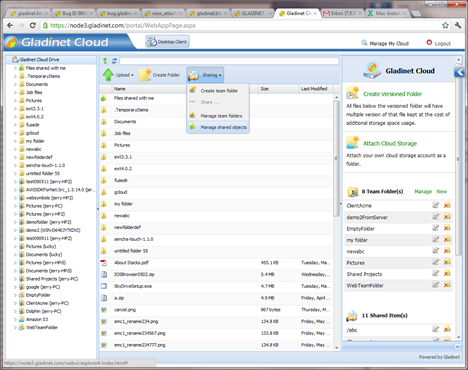
The previous two articles discussed different access methods to your IBM SmartCloud Object Storage and Team Folder collaboration features. This article introduces the Folder and File Sharing feature with your IBM SmartCloud Storage. Functionality wise, Folder and file sharing is similar to team folder collaboration. There are 3 major differences. (1) Team folder is managed by administrator for the team; while Folder sharing is managed by each team member. (2) Team folder can only be published to known team users; while folder sharing can be shared to external user on a read-only basis, in addition to sharing with internal team users. (3) Team folder is always collaboration on a folder level; while folder and file sharing can share on a single file level.

Team Folder with IBM SmartCloud Object Storage

Image
Last article discussed several access methods you can have with IBM SmartCloud Object Storage. This article discusses how to have a team folder in the IBM SmartCloud Object Storage so everyone can share. Assuming you already have an IBM SmartCloud Object Storage account and a Gladinet Team account and you are already checking out the different access clients, such as web portal, desktop drive, file server volume and mobile app. Next step is to check out the team folder and its related features. User Management For team folder related features, first you need to have a team, which means users. There are several ways to create team users. You can create manually or you can import active directory users from your existing infrastructure. You can click “Manage My Cloud” and then “Manage User” to invoke the user manager. For manual creation, you can do it any time you are ready. For import active directory users, you will need to first install “Gladinet Cloud Server” into one of the f...

Easily Access Your IBM SmartCloud Object Storage

Image
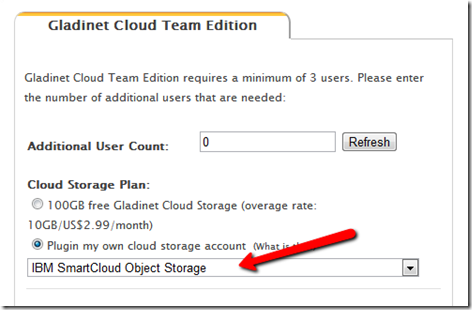
IBM SmartCloud Object Storage is targeted for Enterprise Cloud Storage. Most of the time, it is used for disaster and recovery or as an alternative media storage option. This series of articles discuss other common use cases – team collaboration and file server replacement. The use case will allow you to roam around freely and yet always have access to your files and folders in the IBM SmartCloud, whether the access is direct web browser access; desktop client access; file server access or mobile device access. First you will need an IBM SmartCloud Object Storage account and a Gladinet Team Edition account. Got www.gladinet.com , select Team Edition. In the next page, select “Plugin my own cloud storage account” first, then select “IBM SmartCloud Object Storage”. In the next page, you will enter your IBM SmartCloud Object Storage account information.