Posts

Showing posts with the label Gladinet Cloud

File Server to File Server Synchronization over Cloud Storage

Image
A useful use case for cloud storage is to do file server to file server synchronization over cloud storage. The file servers may come from different locations. In the past, it is not easy to replicate a folder from server A to server B. A VPN needs to be in place for synchronization to happen. It is also not easy to access file server from remote location. Again it requires a VPN. This video demonstrates that we can use cloud storage to do file server to file server synchronization. The end result is that both site can access to the same file server contents and also enable multiple-site, and multiple-place access to the same set of folders. For more information, please visit www.gladinet.com

Gladinet Cloud Android Client New Look and Feel

Image
Gladinet Cloud android client over the years has accumulated many features such as thumbnail for pictures, offline browsing, upload multiple pictures, in-place editing of files and etc. The video below documents the new look and feel since November this year.

Gladinet Cloud iPhone Client New Look and Feel

Image
iOS 7/8 changed to the new crisp icon style. The Gladinet Cloud iPhone/iPad client also get a new set of crisp folder icons to match the new iOS 7/8 style.  Here is a short video documenting the new Gladinet iOS client. It shows the directory browsing, preview files, open files in native application, offline browsing and other features.  

Document Preview Feature

Image
Starting Gladinet Cloud Enterprise build 719, there is document preview feature for the web browser interface. The following video shows the document preview feature inside web browser.

Install Gladinet Cloud Enterprise on Amazon AMI Server 2012 Image

Image
Gladinet Cloud Enterprise is built on top of Microsoft Web Platform, including Windows Server, Internet Information Server, .NET Framework, SQL Server (and Express) and ASP.NET. This makes it very straight forward to install on Windows Server 2012. This video documents how to get it installed on Amazon AMI Server 2012. It is very straight forward. It all started with picking the clean OS image to start with: Windows_Server-2012-RTM-English-64Bit-Base-2014.02.12 - ami-814642e8 Microsoft Windows Server 2012 RTM 64-bit Locale English Base AMI provided by Amazon Here you go, the video …

Gladinet Cloud Enterprise and Its Service Provider Options.

Image
Gladinet Cloud Enterprise has two package options, one is for single enterprise, and the other is for multi-tenant service provider. In the following two video, you can take a closer look at both options. First Let’s take a look at the Service Provider Service Provider Option Enterprise Option

What is New in Gladinet for Year 2014

It is about 50 days into the new year and there are already many changes in Gladinet products and solutions. Here are some of the most important ones. Mobile Client Enhancements iOS client added many features, such as multiple file upload, thumbnail viewing for directory listing. Added token support for security. Android client added many features as well, such as multiple file upload, offline support, and token for security. Large Active Directory Support In January, we simulated an internal active directory forest that covers 3 sub-domains, containing over 300,000 users.  This is largely driven by our enterprise partners. As a result, Gladinet Cloud Enterprise supports very large active directory integration. Better OpenStack Swift Support This is also driven by our partner as more and more are taking on OpenStack Swift as an internal private deployment. Gladinet Cloud Enterprise has been tested against OpenStack Swift again and again, first with Rackspace Cloud Files, the...

Gladinet Cloud New Look and Feel 2013

Image
Today we released a new version of Gladinet Cloud. The most obvious change is the support of new Themes. Now you have Blue, Gray, Classic themes to choose from. Take a look at the following new video and compare to the legacy look and feel.   Now compare to the legacy look and feel. Both theme are available in the new release.  

Gladinet Android Client v2.6 Update

Image
As part of the Gladinet mobile app enhancement and the focus on mobile device support, the Gladinet Cloud Android version 2.6 client was released. This release contains better application interoperability support and remote wipe capability. Open In From other natively installed application, you can use “Open In …” to select Gladinet and upload file from other application back to Gladinet Cloud. Remote Wipe When a user’s account is deleted from Gladinet Cloud, the connected Gladinet Cloud application will clear its own cache and on device information.

Gladinet Cloud Windows Phone 8

Image
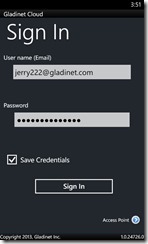
As Gladinet continue to enhance mobile device and smart phone support. Today is another important milestone. The Gladinet Cloud Windows Phone 8 application was submitted to Windows Phone Developer Center and waiting for certification. The Windows Phone 8 application has similar features to the Gladinet iOS and Android application. It is a native application written with Visual Studio 2012 and Silverlight for Windows Phone environment, comes with speed and packed with features. 1. Browse Files and Folders After you sign in to the Windows Phone application, you will see files and folder tree and can browse the folder content.

Gladinet Cloud Mid-Year Review 2013

Image
It is time to review the progress Gladinet Cloud made in the first half of the year. When we are in day-to-day operation, it didn’t feel that there is much change. And now, when we take a break to look back, there is quite some big progress made. 1. Mobile Enhancement There was big progress made on the Mobile applications, including applications on iOS devices, Android devices and even Windows Phone 8 devices. Feature enhancements include better upload/download support; file/Folder sharing and collaboration support; and interoperability with applications installed natively on the devices. 2. Mac OS X Enhancement Mac OS X came out of beta and getting more feature parity compared to the Windows client. Mac OS X client now can attach local folders and sync to cloud. 3. Central Administration Enhancement More group policy support and more settings the administrator can control for the whole team. As Gladinet Cloud focus more toward businesses and enterprises, more group policy and co...

Team Collaboration Over the Cloud

Image
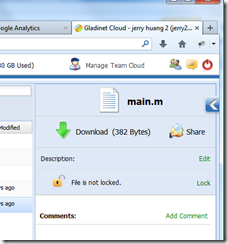
We are all familiar with collaboration in a local area network (LAN) environment, which was fulfilled by a Windows File Server or some device that provides a network share. This is a device in the office that people can all map a network drive to the file server share and collaborate within the office. With the Internet expands and cloud storage technology penetrates more and more into user’s daily work, it will be desirable to collaborate over the cloud, with various kinds of devices, such as the usual Windows based devices, Mac devices, iOS devices and Android devices. Before it happens, most users need clear answers to the following features. File Locking When it comes to collaboration, file locking is a must have feature. Gladinet Cloud provides two places for you to lock files for editing. First place is inside the web portal, you can click on a file and lock the file.

Group Policy in Gladinet Cloud

Image
As Gladinet Cloud is being used by more and more businesses, we got more and more user feedback about what they would like to control about their Gladinet Cloud. Some wants to be able to see team user’s account; some wants to disable team-user from sharing home directory files and folders. Anyway, it is becoming more and more like the user policy concept and group policy concept system administrators are familiar with. This article documents the group policies in the Gladinet Cloud. Security

Gladinet Cloud and It’s Enterprise Focus

In 2012, Gladinet Cloud continues to differentiate from other online storage solutions. While most of the online storage solutions provide a folder sync solution, Gladinet provides a drive mapping solution . Drive mapping provides random on-demand access without the wait for full sync to finish, which is a very good fit for VDI environment. While most of the online storage solutions provide a client device solution, Gladinet provides a file server solution in addition to the client applications. With Gladinet, you can sync a file server share to the cloud and use the share folder over the Internet. While most of the online storage solution resells Amazon S3, Gladinet provides a plugin-your-own-cloud-storage option in addition to the default Amazon S3 storage. If you have Windows Azure, Google Cloud Storage, HP Cloud storage, Nirvanix, OpenStack Swift and EMC Atmos, you can use Gladinet Cloud. Enterprise Focus The above features are very enterprise friendly, such as the use of d...

The Tipping Point for Cloud Storage Migration

Most businesses have heard of cloud storage but haven’t started taking any action towards cloud storage migration. Many CIOs, on one hand are following closely the cloud computing development, on the other hand, are complacent about the existing IT infrastructure and try to avoid disruption to daily operation. If it ain’t broke, don’t fix it. The Disruption Here is a story about how the cloud storage migration happens. Joe is the CIO of a real estate company. A couple weeks ago, the company tape backup was broken. It was quoted around $1800 to get it fixed. So a disrupted event happened. Joe was following cloud storage solutions closely. Since he needs to do something about the backup, why not switch to a cloud storage based solution for backup. As Joe went further down the path of finding a solution, he found out that most of the cloud storage solutions have sharing and team collaboration features. Since cloud storage solution offers that, and Joe has two company sites to taken ca...

A Quick Tour Around Gladinet Cloud Enterprise

Image
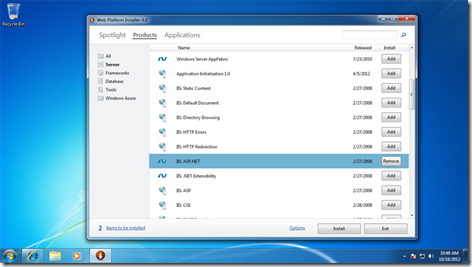
Gladinet Cloud Enterprise is a Windows Installer Package (MSI). It packaged the commercial Gladinet Cloud into an installable package so you can have an on-premise Gladinet Cloud . Now you can have sync & share, collaboration and web browser access, desktop and file server access all under your enterprise data and policy control. Good for security. This article is a quick tour around the install and setup process of the product. The package is built on top of Microsoft Web Platform, i.e. IIS 7/ASP.NET/.NET Framework 4/SQL Server 2008 (Express). Gladinet Cloud Enterprise can be run on Windows 2008 32-bit & 64-bit machines for production environment. For developers and testers, they can also run it on Windows 7 32-bit/64-bit machines. It is recommended that the Gladinet Cloud Enterprise been installed on a clean Windows machine. Step 1: Prepare Microsoft Web Platform You will use the Microsoft Web Platform Installer to prepare for the Microsoft Web Platform. You can insta...

File Sync and Share among Your Distributed Offices

Image
Recently, another potential customer request came in. The customer has 3 offices located in different regions, all in the US. They have a need to share Microsoft Office files such as Word, Excel, Power Point files from each office into a central location to store all the master files. They need to be able to lock files so people from different offices don’t overwrite into each other’s change. They need to have version history of the files in case files are accidentally deleted.  They also need to integrate the solution with a mapped network drive in Windows Explorer. The good news is Gladinet Cloud for Teams has all those required features. We have seen this repeating theme keeps coming up, which also helped shape the current version of the Gladinet Cloud for Teams. Gladinet cloud for teams is made exactly for this purpose – file sync and share among your distributed offices. To start, first you will need to acquire a Gladinet Cloud for team account from www.gladint.com . After ...

Android Client for Gladinet Cloud Team Edition

Image
Gladinet Cloud Android App has been released to the Google Play Store since last week.  It is an important addition to the Gladinet Cloud for Teams. After the Web client, Windows client, File server agent, Mac and iOS app support, now it is Android app. You can enjoy a native android app when browsing Gladinet Cloud from your android devices. The first release targets Android devices with OS version 4.0 (Ice Cream Sandwich) and above (4.1 - Jelly bean). The support for Android devices OS 2.3.3/2.3.5 will come very soon at the end of August 2012. When you search for Gladinet in the Google Play Store, you will see Gladinet App showing up.

Use Cloud Storage to Unify Multi-Site File Structure

Image
Cloud Storage is great for IT administrators trying to maintain file structure across multiple sites. File Structure from one site can be attached to the cloud so it can be viewed and used from the other sites. This is a use case we learned from a Gladinet customer. Gladinet Cloud and Gladinet Cloud Server helpped to reduce the file structure on 3 different sites down to one. This article will review this use case and the basic setup. Assuming you are in the role of an IT admin, managing file servers from 3 different sites and your job is to make sure all 3 servers are available to all 3 sites. Gladinet Team Account First you will need a Gladinet Team account. When you log into your Gladinet Cloud account from the web browser, you will see the root of your “Gladinet Cloud Drive”, which is also your global namespace. Later when you have folders attached from your 3 file servers, they will show up in this namespace. Conceptually, this is similar to the DFS (distributed file system) ...

Different Kind of Folders on Gladinet Cloud

Image
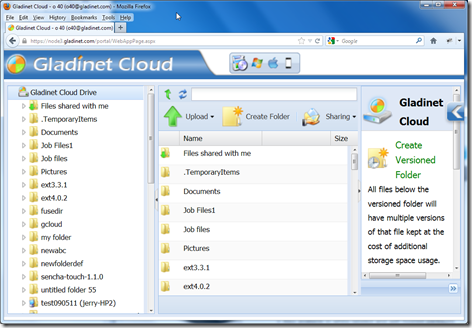
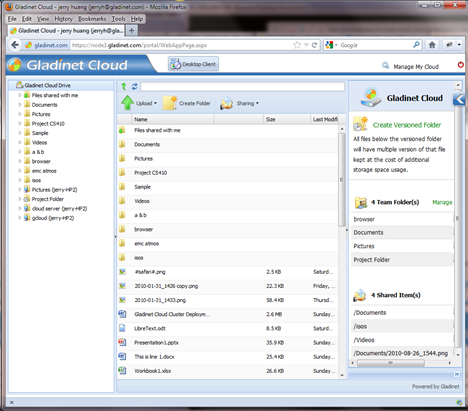
When you log into Gladinet Cloud web portal, you will see your files and folders immediately, in a Windows Explorer-like interface. Once you tried all the Gladinet Cloud features, you may find different folder icons such a  list of icons below. You may be wondering what kind of folders each icon represent and what kind of features are available for each. Not All Folders Are Created Equal