Posts

Showing posts with the label tenant admin

Web Portal - Types of Users

Image
The scope of users (e.g., functionality, feature set, permissions), varies based on the permissions of the user logged into the CentreStack Web Portal. The Cluster Administrator has authority to control almost every aspect of the Tenants created in the cluster; however, they cannot access the files of other users. If the users is a Tenant Admin, they see and control the Team Folders of the users, set up Active Directory connections and create or import users. As a user, Web Portal access is limited to the folders the user has permissions to use and their user settings. Users can also have access to client downloads so they can connect their personal devices to the server. I hope you found this tutorial useful. If you want more content like this, please Subscribe and click the notification bell in YouTube so that you can receive updates from our channel.

CentreStack Tenant Storage Explained

Image
CentreStack is a managed file sync and share solution. When managed service provider use it to help clients to move local storage into cloud, they need to understand how the per-tenant storage is managed. This video demonstrates how to setup a tenant (a client or an organization) and setup tenant storage. There are two different kinds of storage on a per-tenant basis. One is the primary storage and one is secondary storage. So basically it is a multi-tenant system, and with each tenant can map its own root folder storage and mount additional secondary storage with the end goal of sharing folders in those storage locations out to other team users.

Allow Cluster Admin to Manage Tenants’ Management Scope

Image
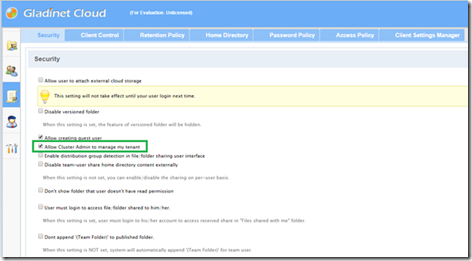
Gladinet Cloud Enterprise is a private file sync and share solution. It comes with two flavors, one for single company, the enterprise flavor and the other for multi-tenant service provider flavor. This article is about the multi-tenant service provider solution. As a service provider, sometimes you have multiple roles. Not only do you need to manage the cluster wide settings and configurations and the overall health of the system, you also need to help tenants manage the tenants’ management scope. In the past, the two management scope are handled by two different users in the system. First is the cluster administrator and second is the tenant administrator for each tenant. Now it is possible to consolidate the two management roles into one. Tenant Gives the Permission Now a cluster admin can manage Tenants directly from her own Tenant Manager Web portal. Once the ‘Allow Cluster Admin to Manage My Tenant’ group policy setting is enabled by a tenant, the cluster admin can directly ...