Posts

Showing posts with the label cloud enterprise

New Video! CentreStack and its Server Agent

Image
CentreStack is a file sync and share solution. It is usually installed in a data center, with a public IP address and a SSL certificate for a DNS name. The server agent is a client for CentreStack. It can be installed in a remote location, typically on a file server inside an Active Directory domain. It provides proxy access to Active Directory and File Server calls by communicating to the CentreStack server. Get your free trial of CentreStack at https://www.centrestack.com/

Use OpenStack Swift for Private Offsite Backup

Image
As we are providing cloud storage access solutions for OpenStack Swift, we are also learning from our customers about how they are using the solution in their companies. In this customer study, It involves two pieces of technology solutions, the OpenStack Swift, and Gladinet Cloud Enterprise. OpenStack Swift is established off-site, but privately in a data center, with a service provider. The Gladinet Cloud Enterprise is established on-site, providing the on-ramp and connectivity to the private OpenStack Swift instance off-site. The Setup

Use Cloud Solution to Replace in-house FTP Server

Image
In the past 15 years, FTP server was used as a way to pass documents between companies. For example, you could be a document management company or a media conversion company. Your customers mail you their documents or VHS tapes, you will convert the paper media or VHS tape into digital media and store on the FTP server for customers to download.  It sounds so yesterday, as if everyone was good at using FTP to retrieve electronic documents. With today’s technology, you would expect FTP accessing method replaced with web browser access. Customers can be directed to a folder link to preview the converted digital media and click a button to download the whole folder of documents. This is possible with Gladinet Cloud Enterprise . Gladinet Cloud Enterprise server will replace an FTP server, providing web based access method, in addition to desktop client access methods. 1. Connecting to Local File Server Storage Similar to FTP Server that can connect to Local File Server Storage, Gla...

Any Company Can have a User Facing Cloud Solution

Image
Long long time ago, only a few can enjoy computing power until PC became a reality so any one can enjoy computing power at home. There were several steps along the way to made that happen. First was that computer no longer occupy a whole room of space. They are becoming smaller and smaller so it is cost-effective to deliver and it was also possible to be put on a desk. Second was that computer was cheaper. It was no longer a million-dollar machine but a thousand-dollar machine or even a hundred-dollar machine. Same thing is happening now for cloud solution. Companies like box and dropbox created these nice customer facing cloud solutions, which many companies and MSP (Managed Service Provider) wish they can host and serve their own to customers.  There are also companies that want to serve their own employee with a solution like this too. Just like the PC market, there is a market for smaller, easier and cheaper to deploy, user facing cloud solution. Gladinet Cloud Enterprise wa...

Gladinet Cloud and It’s Enterprise Focus

In 2012, Gladinet Cloud continues to differentiate from other online storage solutions. While most of the online storage solutions provide a folder sync solution, Gladinet provides a drive mapping solution . Drive mapping provides random on-demand access without the wait for full sync to finish, which is a very good fit for VDI environment. While most of the online storage solutions provide a client device solution, Gladinet provides a file server solution in addition to the client applications. With Gladinet, you can sync a file server share to the cloud and use the share folder over the Internet. While most of the online storage solution resells Amazon S3, Gladinet provides a plugin-your-own-cloud-storage option in addition to the default Amazon S3 storage. If you have Windows Azure, Google Cloud Storage, HP Cloud storage, Nirvanix, OpenStack Swift and EMC Atmos, you can use Gladinet Cloud. Enterprise Focus The above features are very enterprise friendly, such as the use of d...

Gladinet Cloud Enterprise for Service Providers

Image
Managed service providers are pretty familiar with selling storage products such as Windows File Server or NAS storage. They are also looking for ways to sell more value-add products around the storage products. In this sense, having an online access solution that customers can use around those storage products makes a lot of sense. Especially the online access solution can add browser base file manager, mobile apps, desktop clients and file server clients, which cover backup, access, synchronization and sharing, and team collaborations. Gladinet Cloud Enterprise was released back in October 2012. It can already provide online access solutions to a business, as an on-premise private cloud solution. Now Gladinet Cloud Enterprise was enhanced to have a service provider edition. In this edition, service provider can create multiple tenants and connect to multiple active directory domains Admin Panel From the admin panel, you can create multiple tenants. Each tenant can be an independ...

Managed File Sync & Share Solution

Image
You are familiar with managed and hosted service since your company in one way or the other may be using a managed service such as MS Exchange, MS Lync, MS CRM, file storage and disk space. If you are a service provider yourself, you are even more familiar with these since you are managing hosted solutions for your customers. You may have MS Exchange server, MS Lync, CRM server and MS Windows 2008 server in your data center where you manage and service your customers. Now, have you heard of managed file sync & share service? Where you can install a server or a group of servers in your data center; you then manage this service either yourself or for your customers? If you are looking for a solution like this, you found one in Gladinet Cloud Enterprise . To make sure it is the right solution for you, just use the following quick cheat sheet, which contains a list of features you need. If you find a feature that meet your requirement, you check it off. If you find you are checking ...

A Quick Tour Around Gladinet Cloud Enterprise

Image
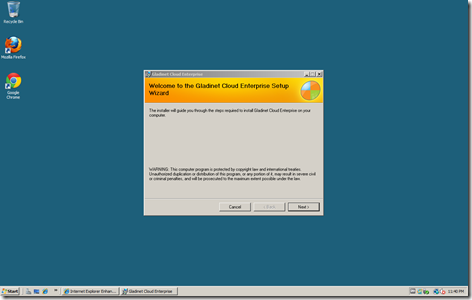
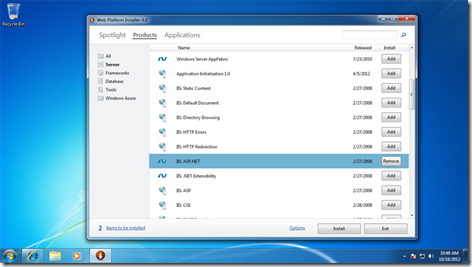
Gladinet Cloud Enterprise is a Windows Installer Package (MSI). It packaged the commercial Gladinet Cloud into an installable package so you can have an on-premise Gladinet Cloud . Now you can have sync & share, collaboration and web browser access, desktop and file server access all under your enterprise data and policy control. Good for security. This article is a quick tour around the install and setup process of the product. The package is built on top of Microsoft Web Platform, i.e. IIS 7/ASP.NET/.NET Framework 4/SQL Server 2008 (Express). Gladinet Cloud Enterprise can be run on Windows 2008 32-bit & 64-bit machines for production environment. For developers and testers, they can also run it on Windows 7 32-bit/64-bit machines. It is recommended that the Gladinet Cloud Enterprise been installed on a clean Windows machine. Step 1: Prepare Microsoft Web Platform You will use the Microsoft Web Platform Installer to prepare for the Microsoft Web Platform. You can insta...

Introducing Gladinet Cloud Enterprise

Image
Today Gladinet released Gladinet Cloud Enterprise . It is an installable cloud storage solution for enterprises concerned about security, control and compliance. It contains all the Gladinet Cloud Team Edition features you see on www.gladinet.com and packaged into a Windows Installer (MSI) package. Typically it is a 5-10 minutes installation and configuration process and it will be up and running immediately. Since the package can run onsite, there are some additional feature sets, such as deep Active Directory integration so existing Active Directory users can start using the Gladinet Cloud for Enterprise directly. Another additional benefit is that it allows using Enterprise’s own file server storage, or private OpenStack Swift storage, or private EMC Atmos storage as the backend storage. While, at the same time, if an Enterprise is comfortable with their own Amazon S3 account, Google Cloud Storage account, Windows Azure account, they can choose to use these as the backend storage...