Posts

OpenStack Windows Client

Image
Every Hosting Provider is building its own cloud storage solutions. The situation is either build it or lose business to whoever has it, such as Amazon S3 , Rackspace Cloud Files or Windows Azure Blob Storage . Now the question is how to build it fast and take it to market soon. In this sense, OpenStack Object Storage is very attractive. First it is open source. Second, it is based on Rackspace Cloud Files so it has big commercial companies supporting the initiative.   If you are a service provider built on OpenStack storage, you are thinking about how to deliver that storage to user’s desktop. If you are a SMB user, you are thinking about how to use the storage from your desktop too. Either way, you are looking for a Windows client that supports OpenStack storage. With the release of version 2.4, OpenStack is supported in Gladinet Cloud Desktop, CloudAFS and Cloud Backup, collectively the Gladinet Cloud Storage Access Suite.

Google Storage vs. Amazon S3

Image
If you have a Google Storage for Developers account (through invitation only), good for you because you can continue to use the 100GB free storage as long as Google Storage is still in preview mode. If you don’t have a Google Storage for Developers account already, you can sign up with billing information. You don’t get the 100GB free storage but you can use up to 1 Terabyte of storage as long as your billing info allows. It is now in this Preview/Production mixed mode. Before long, Google Storage may enter into the full production mode, competing with Amazon S3 for the cloud storage business. If you are new to the cloud storage, you may be looking for some review materials to decide which one you will use. This article will compare them from different aspects.

Google Storage for Developer–How to Use?

Yesterday I received a Google Storage for Developer Update email from the Google Storage Team. The Email Here is a quote from the email: Thank you for using Google Storage for Developers. We write today to make sure you're aware that we've changed our service. Increased Account Limits & Billing When we began the Google Storage for Developers preview, all accounts were free and limited to 100 GB of storage. Google Storage accounts can now access increased storage by providing credit card billing information. Additionally, for accounts with billing we provide a service level agreement (SLA). Find our published service level agreement at: https://code.google.com/apis/storage/docs/sla.html . Accounts with billing can now use up to 1 Terabyte of storage by default. If you need more capacity, just let us know! Contact information is on our FAQ page: http://code.google.com/apis/storage/docs/faq.html . The Change Officially still in preview mode,  Google Storage starts to ...

Cloud Storage Strategy Series V–Mobile Workers

Image
When you have people working from home or visiting customers, you have a mobile worker. Traditional way of providing mobile worker support is through VPN, virtual private network, which is before we saw the Cloud Storage revolution. There are problems that VPN can’t solve. For example, if you are on the customer site, VPN back to corporation may be blocked. If you are at the airport, the WiFi at the airport may have certain ports blocked as well. With cloud storage, you now have another option for the mobile workers. Since cloud storage is off-premise by nature, it is easier to access when the worker is on the road. Cloud Storage on Desktop One of the solution is to attach Cloud Storage to mobile worker’s laptop. Gladinet Cloud Desktop is the solution for this. (1) It can map a network drive to cloud storage. Users can save documents directly to the network drive. (2) It can setup a synchronized local folder. Contents saved to the local folder will be synchronized to cloud storag...

Rackspace Cloud Files vs. Amazon S3 vs. Azure

Image
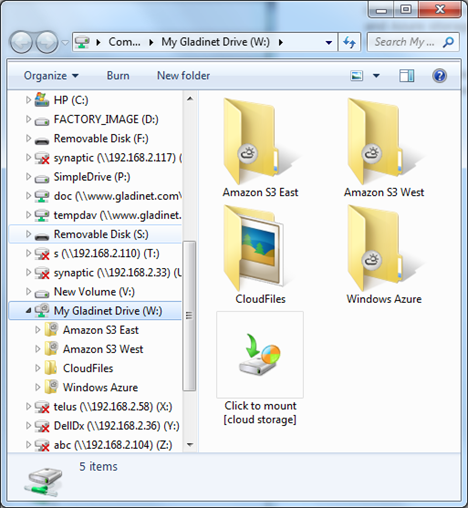
As usual, when the support of a new cloud storage service provider is added to the Gladinet platform, we will do basic speed test against supported service providers to see how they compare to each other. This time we will compare Rackspace Cloud Files with Amazon S3 and Windows Azure Blob Storage. The Test Gladinet Cloud Desktop is used for the test. Cloud Files, Amazon S3 and Azure storage accounts are mounted into Windows Explorer as virtual folders.

How to Map a Network Drive to Rackspace CloudFiles

Image
With the release of Gladinet Cloud Desktop version 2.4, Rackspace CloudFiles is now supported. With Gladinet Cloud Desktop, you can map a network drive to Rackspace CloudFiles and do drag and drop transfers. You can sync a local folder’s content to Rackspace CloudFiles. You can also enable CDN for the container so the files you transferred up to CloudFiles can be integrated to CDN services. Step 1 – Mount the CloudFiles Account   Now CloudFiles is in Windows Explorer.

What is New in Gladinet Version 2.4

Gladinet Cloud Access Suite now reached version 2.4.  New Service Providers Supported This release adds support for Rackspace CloudFiles , OpenStack Object Storage , CAStor Storage and Google Apps Premier. This adds to the long list of cloud storage service providers that the Gladinet Platform supports. Amazon S3 AT&T Synaptic Storage Box.net Caringo CAStor EMC Atmos FTP File Server Share Google Docs Google Storage Mezeo Nirvanix OpenStack Peer1 CloudOne Rackspace CloudFiles Windows Live SkyDrive Windows Azure Blob Storage WebDav New Package Bundle Partners and customers are guiding us on the need of different access scenarios to support. As a result, Gladinet Cloud Desktop installation now has Cloud Backup available as a separate add-on. It is easier to manage for customers and partners that need both products on a single PC. Version 2.4 also marks the first time the simultaneous relea...